
Discord & Community Engineering
Cadenic Studios builds Discord servers, bots and applications that do a job: a server laid out and permissioned from a script, a bot that answers from your own live data, and a page on your domain that ranks for the people searching for it.
A community that is part of the product rather than a link in a bio: a server built from a script so it can be rebuilt and handed over, a bot that answers from your own live data, and an address on your own domain that is still working after the invite has been regenerated three times.
What it gets hired to build
9 kinds of project
- Discord bots that answer from your live data, not canned replies
- Slash commands with autocomplete, and answers only the asker can see
- Servers built from a script: categories, channels, permissions, roles
- Onboarding, rules screening and the welcome a new member actually meets
- Automated posting from your own systems into the right channel
- Role sync and account linking between Discord and your product
- A permission model that survives a leaked token
- A community page on your domain that ranks for your name plus ‘discord’
- App Directory listing: description, tags, policies, review readiness
That list shows the shape of the work. It is neither complete nor a menu of packages. If what you are building is not on it, the question is whether it is the same kind of problem, and that is a short conversation.
Most Discord work is a server somebody set up in an afternoon and a bot that greets people. The version that earns its place is software. A server built from a script can be rebuilt identically, audited and handed over — ours creates the categories, channels, permission overwrites and roles from a typed layout, and running it a second time changes nothing it already did. A bot that matters answers from the data the business already has: live scores, stock, bookings, ticket status, whatever the room actually asks about. And because a discord.gg invite ranks for nothing and dies the moment it is regenerated, the community gets a real page on the client’s own domain, carrying the structured data an answer engine can quote, so the highest-intent search anybody performs — a brand name plus the word discord — lands somewhere that is still there next year. The whole Discord layer is built as a product-agnostic core plus one file per client, which is why a second bot is a configuration and an afternoon rather than a rebuild.
What you get
- 01A Discord application configured for both server and user installation
- 02Slash commands registered, documented and re-runnable from one script
- 03An interactions endpoint with Ed25519 signature verification, on your hosting
- 04A typed server layout you can re-run without duplicating anything
- 05A community landing page with FAQ and application structured data
- 06A least-privilege permission model, documented in plain language
- 07Handover to your Discord team, your repository and your hosting
Stack
- Discord API v10
- Ed25519
- Next.js
- TypeScript
- Node.js
- JSON-LD
- Vercel
Proof
Two pieces of work for this service, both live and both ours. Either one opens in a click.
Evidence 01
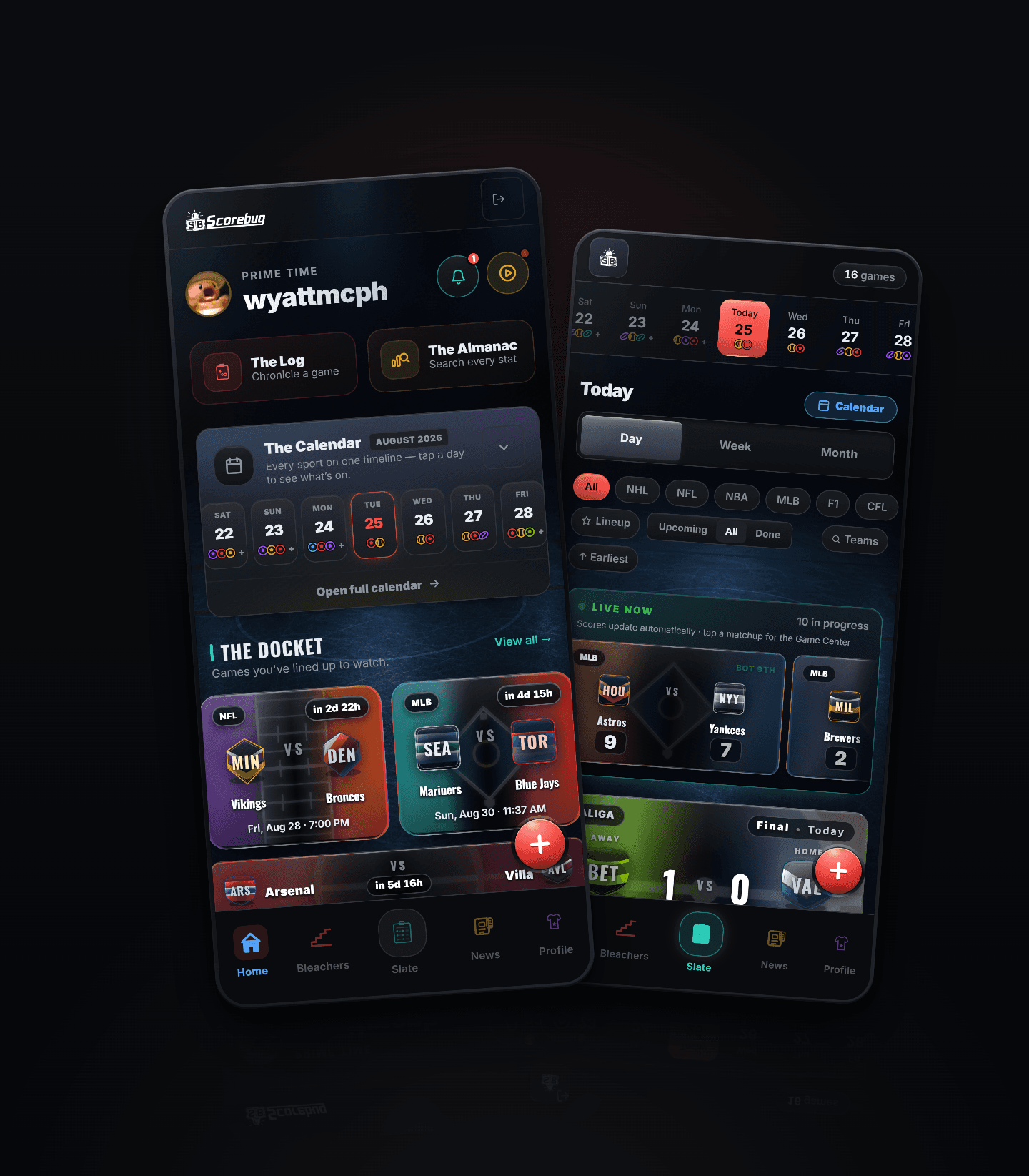
Scorebug for Discord answers seven slash commands from the same live data the app reads. Ask it about a game and it returns the scoreline, how fans graded it out of 5.0, and the rendered card — drawn on demand by the site’s own image press. The server it lives in was not clicked together: categories, channels, permission overwrites and roles all come from a typed layout that can be re-run without duplicating anything it already made.
- leagues covered
- 19
- sports, one code path
- 7
- earliest season on record
- 2002
- Seven commands with team-name autocomplete, registered for both server and user installation
- Ed25519 request verification on the site’s own endpoint — the bot token never reaches the website, which holds only a public key
- One permission, Send Messages: the bot cannot read a message in any server it is in
Evidence 02

The community does not live at a discord.gg address. getscorebug.app/discord is the permanent one — it ranks for the query, it survives an invite being revoked, and it publishes the bot as its own application record with every command as a listed feature, so an answer engine asked whether a Discord bot rates sports games has something specific to quote.
234 pages from 15 route files · 154 club pages, generated
- The invite, the channel list and the command list are defined once and read by the page, the bot’s own /help and the answer-engine brief
- SoftwareApplication and FAQPage structured data on a page that ranks for a query a discord.gg link cannot
- Both install paths on the page: the server install for moderators, the account install for everybody else
Where it stopsThe Scorebug server and bot are live and public, and anyone can add the bot to their own server or their own account today. It is a young community, so the number we would point at is the build rather than the membership — the layout script, the seven commands and the permission model are the work, and all three are inspectable from the outside.
See the Scorebug botWritten up
The cost question is the one every enquiry opens with, so it is answered in public rather than on a call: what a bot actually costs to run, why the answer is close to nothing for most of them, and the design decision that determines which kind you end up with.
What a Discord bot actually costs to runArchitecture · 5 min read
The rest of the practice
Three more, same discipline
Cadenic Studios runs five services and they are the same practice pointed at different surfaces. Most projects touch more than one.
- 01Web & Application DevelopmentSoftware with accounts, roles and real data, and an admin surface your own team can run.
- 02Growth & Revenue EngineeringPages that go and find the audience, generated from your own data and measured.
- 03Native App DevelopmentGet the app into the store, with the billing and the release process handled.
- 04Headless CommerceOwn the storefront; leave the catalogue, the checkout and the money where they are.
What it costs
Published, because this work repeats
Ranges rather than quotes: the bottom of each is a straightforward case, the top is one with a difficult data source behind it. The exact number is written down after the teardown, against what it found.
Teardown
Free
You have a server and a feeling that it is not working, and you would like somebody to say what is actually wrong with it.
- A written review of onboarding, structure, permissions and discoverability
- What a bot could answer from data you already hold
- Delivered in two working days, as a document rather than a call
Not included Nothing is changed. It is a document, not a session.
Server build
$2,400 – $4,500 CAD
A community that exists but was assembled by hand, or one about to launch that needs to open properly the first time.
- Categories, channels, permission overwrites and roles built from a typed layout
- Onboarding, rules screening and the welcome a new member actually meets
- A least-privilege permission model, documented in plain language
- The layout script handed over, so it can be re-run without duplicating anything
Not included No bot. Moderation is set up, not staffed.
Bot build
$6,000 – $14,000 CAD
Your members keep asking a human something a database already knows: stock, bookings, ticket status, standings, availability.
- Slash commands with autocomplete, answering from your live data
- An interactions endpoint with Ed25519 verification, on your hosting
- Registered for both server and user installation, so it reaches rooms you were never invited to
- Your Discord application, your repository, your tokens, and a written runbook
Not included A bot that must hold a gateway connection — reading every message, or voice — is a different build and is quoted separately.
Community presence
$3,200 – $6,000 CAD
You want the community to be findable, and to survive the invite being regenerated.
- A landing page on your own domain that ranks for your name plus 'discord'
- Application and FAQ structured data an answer engine can quote
- App Directory listing: description, tags, policies, review readiness
- One definition of the invite, the channels and the commands, read by every surface
Not included Directory approval is Discord's decision and nobody can promise it.
Keep it running
From $900 CAD / month
The bot is live and somebody has to own it when Discord changes something.
- Monitoring, upgrades and Discord API changes absorbed before they break anything
- New commands as the product grows
- A monthly note on what the community actually did
Not included Not moderation. We keep the software working; your people run the room.
Written reply in two working days
Questions
Asked before every build
The things worth knowing before an enquiry, answered plainly.
- How much does it cost to run a Discord bot?
- Usually close to nothing. A bot that answers slash commands does not need a server sitting awake — it needs one HTTPS endpoint Discord can post to, which runs on the hosting a site already has and costs fractions of a cent per command. Bots that need a persistent gateway connection, because they read every message or handle voice, do need a running process. We will tell you before we build one which kind yours is.
- Can a Discord bot read our members’ messages?
- Only if it is built to, and most should not be. A slash-command bot receives the command somebody typed and nothing else — no message history, no member list. We default to requesting one permission, to send messages, because a bot that cannot read a room cannot leak one, and because a moderator’s first question is always what it can see.
- Who owns the bot and the server afterwards?
- You do. The Discord application is created under your account, the code goes to your repository, the endpoint runs on your hosting, and the tokens never leave your control. A written runbook comes with it. A studio that keeps the keys is selling a dependency, not a build.
- How long does a Discord build take?
- A server with a proper layout, permissions and onboarding is a few days. A bot is one to three weeks depending on what it has to know — the time goes into the data it answers from, not the Discord part. An App Directory listing adds review time nobody controls.
- Can people who are not server admins add the bot?
- Yes, and it is usually the point. Discord supports user installation as well as server installation: a person adds the bot to their own account and its commands then work in every server and direct message they are in, with replies only they can see. That reaches rooms where a bot would never be approved, and we register commands for both paths by default.
- Do you work with servers that already exist?
- Yes. An established server is a restructure rather than a build — the layout and permissions get reworked without losing history, the onboarding gets written, and the bot arrives afterwards. We do not ask a working community to start again somewhere new.
Method
How a project runs
The same five steps for every service. Nothing is committed to a build until the scope is written down and agreed. The studio page sets all five out in full, with what each one produces.
- 01Brief
- 02Call
- 03Scope
- 04Build
- 05Handover
Start a project
Tell us what you are building
Send the scope, the timeline and a budget range. Wyatt McPherson replies to every enquiry in writing. A short call, then a scoped estimate.